Closing the Loop in Salesforce: From Notes to Deal Intelligence (and Back)
Manual CRM updates erode trust. Notes live in one place, scores in another, and leaders fly blind between board updates. Our GTM vision is simple: a Revenue Command Center that helps teams Plan, Analyze, Predict, and Act from one pane of glass. That starts with closing the loop where reps work every day: Salesforce.
What We Shipped
Demo: add a note in Salesforce → Summit53 extracts MEDDPICC → pushes deal scores back to Opportunity fields.
- Notes → Signal: Summit53 reads Opportunity notes and extracts MEDDPICC (and other frameworks) with auditable evidence.
- Signal → Score: We compute deal health and forecast confidence based on the evidence and pipeline context.
- Score → Salesforce: We push those scores back to your Opportunity fields (respecting FLS and permissions).
- Score → Leaders: The same scores roll up into Summit53’s Pipeline Intelligence and Revenue Intelligence modules—so leadership sees risk clusters and forecast confidence in context (by segment, region, product).
Business Outcomes
- Fewer manual updates: Reps add a note; Summit53 does the rest.
- Transparent trust: Every score maps to evidence snippets—no black box.
- Earlier risk detection: Leaders see risk pockets and trends early, not at quarter-end.
- Sharper forecasts: Confidence connects the why (deal health) to the what (commit/best case) and the what next (prioritized actions).
How It Works (in Plain English)
- Connect to Salesforce via OAuth (official REST APIs with standard scopes).
- When an Opportunity note is added, Summit53 extracts MEDDPICC components and evidence.
- Deal scores update in Summit53, and we PATCH your configured Opportunity custom fields (e.g.,
Summit53_MEDDPICC__c,Summit53_Forecast_Confidence__c). - Those scores roll up into Pipeline & Revenue Intelligence so executive KPIs reflect real deal health.
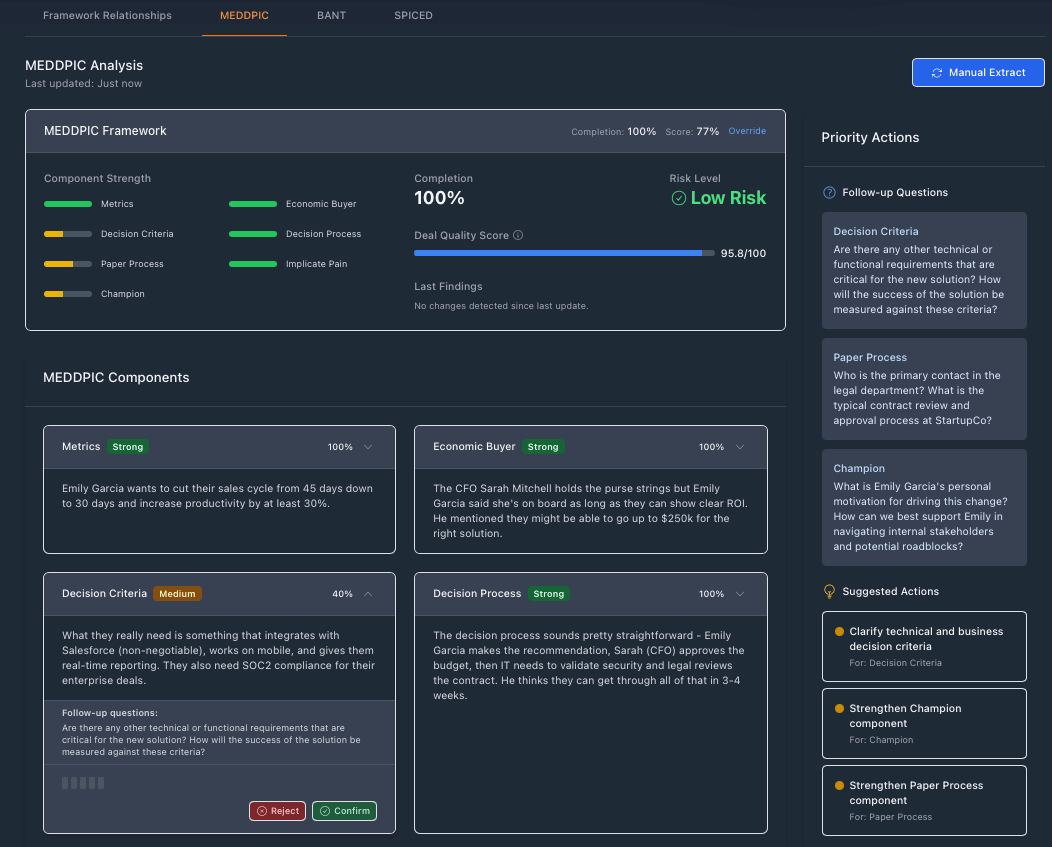
Add a note → extract MEDDPICC → push deal scores back to Salesforce fields. Evidence-backed and auditable.
What’s in Your Control
- Field mapping: Choose the exact Salesforce API names to write to (supports namespaces).
- Security & FLS: We respect field-level security and Opportunity permissions.
- Sandbox-first: Configure in sandbox, test, then switch to production.
Quick Start (Sandbox, 2–3 Minutes)
- Create two custom fields on Opportunity (Number/Percent):
Summit53_MEDDPICC__candSummit53_Forecast_Confidence__c(or your preferred names). - Grant the integration user Edit access to these fields (FLS) and Opportunity.
- In Summit53 → Settings → Integrations → Salesforce, enable push-back and paste the exact API names (e.g.,
Summit53_Forecast_Confidence_c__cif your base name includes_c). - Add a note to a test Opportunity in Salesforce. Summit53 auto-extracts MEDDPICC and updates your fields.
- Optional: use the Push Now action in Summit53’s settings to trigger a one-off update for a specific Opportunity Id (006…).
Best Practices
- Field API names: Copy the exact API Name from Salesforce (not the label). Custom fields end with
__c; namespaced fields begin withPkg__. - Naming: If your org’s naming adds
_cin the base name, Salesforce will generate…_c__c— valid; use it verbatim. - Permissions: Validate FLS and test a write in sandbox first.
- Evidence, not magic: Managers can click from the score to the snippet that drove it.
How This Ties to the Revenue Command Center
Scores flow through Summit53’s GTM pillars:
- Plan & Predict (Pipeline Intelligence): More provable forecasts via confidence ranges and risk patterns.
- Analyze & Identify (Revenue Intelligence): Leaders see risk clusters with evidence-backed drivers.
- Act (Execution Intelligence): Signals turn into prioritized next steps for AEs, bridging the “why” to the “what next”.
Security & Governance
- OAuth with refresh; no credentials stored in plaintext.
- Respects Salesforce FLS and Opportunity permissions.
- Honors API limits with backoff and clear audit logs per record.
- Sandboxes supported for safe UAT before production roll-out.
Roadmap
- Scheduled push-back (nightly) with change cursors and batching.
- “Check FLS” helper to validate field writability.
- Push-back extras: notes summary, next best actions, risk flags.
- Status panel in settings for last push stats and top errors.
Want to try this in your org? We can usually get a secure proof-of-value running in under an hour. Get in touch.
“Salesforce” and related marks are trademarks of Salesforce, Inc. This integration uses Salesforce’s official OAuth + REST APIs and respects your org’s security model.