Bringing Sales Intelligence to Your Thinking Partner: Seven Open-Source Claude Code Skills for Sales Leaders
Every week, the same pattern plays out in sales organisations around the world. A VP of Sales opens the CRM, pulls pipeline data into a spreadsheet, cross-references qualification framework scores, builds a deck for the QBR, preps coaching notes for three 1:1s, reviews six at-risk deals, and drafts re-engagement emails for the ones going dark. The data is all there. The frameworks are understood. The problem is not a lack of intelligence — it is the hours of manual assembly required to turn that intelligence into something actionable.
Meanwhile, Claude has quietly become where many of these same leaders do their thinking. They use it to draft strategies, pressure-test deal narratives, and structure their thoughts before pipeline reviews. But until now, Claude could not see their actual CRM data. It could reason about deals in the abstract, but it could not pull a live health score, check framework gaps on a specific opportunity, or tell you which deals drifted since last week.
That gap is what we set out to close. We have open-sourced seven Claude Code skills that connect Claude directly to your live CRM data via the Summit53 MCP server. Each skill automates one of the high-value workflows a sales leader already performs — deal reviews, rep coaching, QBRs, pipeline surveillance, board reporting, win/loss analysis, and deal re-engagement. The output is not a summary or a suggestion. It is the actual deliverable: a polished PPTX deck, a Gmail draft, or a structured digest with alerts written back into the CRM.
This article walks through each skill, explains the problem it solves, and shows what the output looks like in practice. If you are a sales leader who already uses Claude as a thinking partner, this is about giving that partner access to your pipeline.
Want to see it in action before reading on? This 13-minute walkthrough runs through a full weekly pipeline review, deal coaching, and QBR prep — entirely inside Claude, using Summit53’s MCP tools.
Timestamps: 0:00 Intro and setup · 2:30 Weekly action plan · 3:30 Deal Action Engine · 5:30 Deal Review Prep · 9:30 Rep Coaching Report · 12:30 QBR Generator. Prefer a direct link? Open on YouTube.
The Intelligence-to-Action Gap
The numbers tell a familiar story. According to recent research, sales reps spend only 28% of their week actually selling. CRM data entry alone consumes 17% — that is over 250 hours per year per rep. And the impact is visible at the top line: 78% of sellers missed quota in 2025, up from 69% the year before.
But framing this as an “admin problem” misses the real issue. The most time-consuming work in sales leadership is not data entry — it is synthesis. It is pulling data from six different CRM views, cross-referencing framework scores against activity logs, building a narrative about why a deal is stalled, and packaging that into a format your board, your reps, or your own decision-making can use. This is the core intellectual work of running a sales organisation. It just happens to require an enormous amount of manual assembly.
AI agents in 2026 are closing this gap. Companies using AI agents in sales operations report revenue increases of 3–15% and sales ROI improvements of 10–20%. But the highest-ROI deployments share a common pattern: they target high-frequency tasks that consume leadership time without requiring deep relationship judgement. Deal review prep, pipeline analysis, coaching preparation, forecast reporting — these are precisely the workflows where AI can do the assembly while you bring the insight.
What Are Claude Code Skills?
If you have used Claude for strategic thinking but wished it could see your actual pipeline, Claude Code skills are the bridge. A skill is a reusable AI workflow that tells Claude both what to know and what to do. Unlike a one-off prompt, a skill encodes a complete process: which CRM data to pull, how to analyse it, what output format to produce, and how to deliver the result.
The connection between Claude and your CRM happens through the Model Context Protocol (MCP)— an open standard that gives Claude secure, authenticated access to external tools. The Summit53 MCP server exposes your pipeline data, framework scores, activity logs, deal narratives, and risk analytics as tools that Claude can call. When you say “prep me for my deal review with Sprout Retail,” the skill orchestrates a sequence of MCP calls — fetching the deal record, pulling framework scores, checking activity gaps, reading the notes summary, assessing risk — then synthesises everything into a structured output.
The key difference from a dashboard is that the output is the deliverable itself. Not a screen you have to interpret and then manually turn into a deck or an email. The skill produces the deck. It drafts the email. It writes the alert back into the deal record. The thinking and the doing collapse into one step.
Seven Skills for the Work You Already Do
We designed these seven skills around the actual weekly rhythm of a sales leader: Monday deal reviews, Tuesday 1:1 coaching sessions, mid-week pipeline surveillance, Friday QBR prep, and the ongoing work of re-engaging stalled deals and reporting upward. Each skill maps to one of these moments. Here is what they do and how they work.
Deal Review Prep
The problem: Before every pipeline review, you scramble to pull deal data, cross-reference qualification scores, and figure out the right questions to ask. Your AEs scramble to make sure they have answers. Both sides spend 20–30 minutes preparing for a conversation that should be about coaching, not data retrieval.
What the skill does: The /deal-review-prep skill generates a 10-slide coaching-ready PPTX deck for any opportunity. It pulls the full deal record (amount, stage, close date, health score, discount), qualification framework scores across MEDDPIC, BANT, and SPICED, the risk heatmap assessment, deal drag analysis (waste score, staleness, activity level), the AI-generated notes summary (objections, commitments, competitive dynamics), and the complete activity log. It then assembles this into a structured narrative with specific risk factors, framework gaps, and suggested coaching questions.
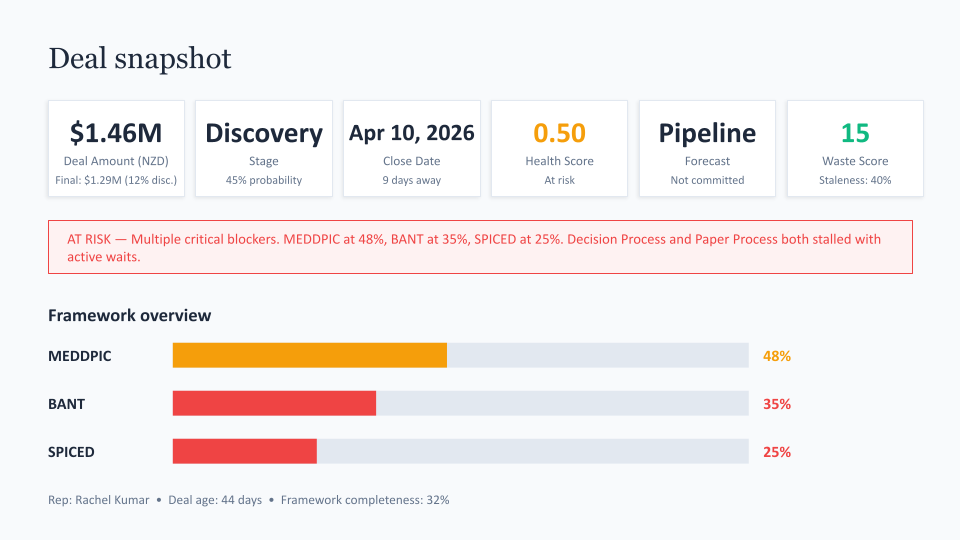
A deal snapshot slide generated by the deal review prep skill. Framework scores, health score, waste score, and risk assessment are pulled from live CRM data — not manually assembled.
Why it matters: The deal review conversation shifts from “walk me through where this deal is” to “your MEDDPIC is at 48% with Decision Process and Paper Process both stalled — what is blocking procurement?” The skill does the assembly. You bring the coaching.
Rep Coaching Reports
The problem: Effective 1:1 coaching requires context — not just how a rep’s deals are tracking, but where their framework gaps cluster, which engagement patterns are working, and what specific evidence supports each recommendation. Most managers walk into 1:1s with a CRM tab open and good intentions, but without a structured view of the rep’s entire book of business.
What the skill does: The /rep-coaching-report skill generates a 10-slide coaching deck for an individual rep. It pulls their pipeline, deal risk scores, MEDDPIC framework gaps, activity patterns, and win/loss history, then identifies the specific areas where coaching will have the highest impact. The output includes prioritised focus areas for the week, each with specific actions, deal references, and dollar amounts at stake.
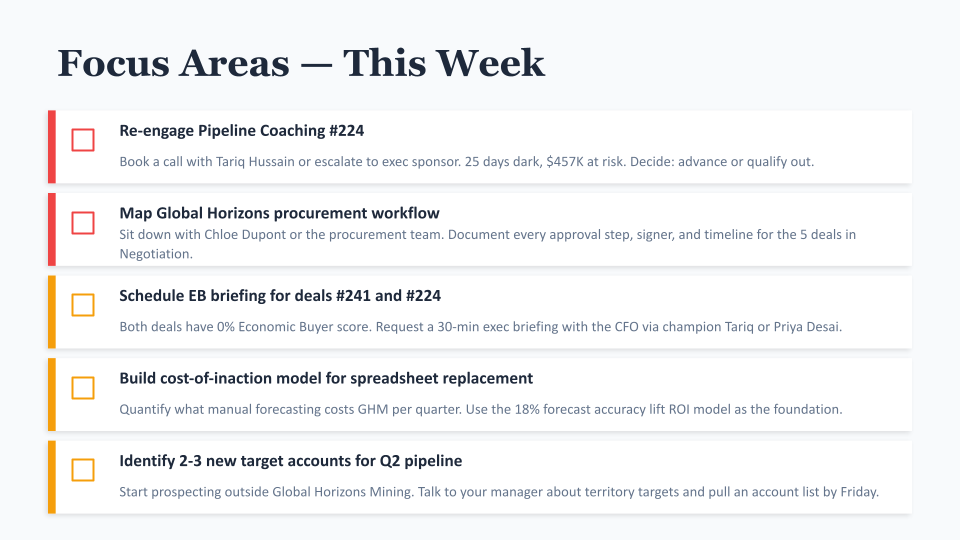
A coaching focus areas slide from the rep coaching report. Each action is tied to a specific deal, dollar amount, and framework gap — not generic advice.
Why it matters: Notice the specificity in the output. “Re-engage Pipeline Coaching #224 — 25 days dark, $457K at risk. Decide: advance or qualify out.” This is not a generic suggestion to “follow up on stalled deals.” It is a data-backed coaching action with the deal reference, the time since last contact, the dollar exposure, and a clear decision framework. The skill turns your CRM data into the coaching conversation you would have prepared if you had an hour to spend on each rep.
Quarterly Business Reviews
The problem: QBR prep is the quarterly scramble that every sales leader dreads. You need revenue performance against targets, pipeline health metrics, forecast confidence levels, deal drag analysis, rep performance comparisons, and a narrative that ties it all together. Most leaders spend the better part of a day pulling this together from multiple CRM views, spreadsheets, and last quarter’s deck.
What the skill does: The /qbr-generator skill produces an 11-slide QBR presentation by pulling live data from across the CRM. It covers revenue actuals vs. targets, pipeline coverage ratios, forecast confidence breakdowns, deal drag and velocity analysis, framework health across the team, and account execution health. The deck follows a narrative arc: where we are, how we got here, what is at risk, and what we are doing about it.
Why it matters: The QBR deck is often the single most important artefact a sales leader produces each quarter. It shapes how the executive team, the board, or the CEO understands revenue performance. Spending a day assembling it means a day not spent on the pipeline itself. The skill shifts the leader’s time from building the deck to refining the narrative — adding their own commentary, adjusting the story for the audience, and preparing for the hard questions.
Investor and Board Reporting
The problem: Board decks require a fundamentally different lens on the same CRM data. An investor does not care about individual deal risk scores or MEDDPIC gaps. They care about ARR growth trajectory, net revenue retention, revenue mix concentration, pipeline coverage relative to targets, and how the company benchmarks against industry medians. Translating operational CRM data into this view is a separate, time-consuming exercise.
What the skill does: The /investor-revenue-report skill generates a 7-slide board-ready deck covering total ARR, growth trends, net revenue retention, revenue mix (new business vs. renewal vs. expansion), pipeline coverage, forecast confidence, and risk analysis — all benchmarked against industry standards for the company’s stage.
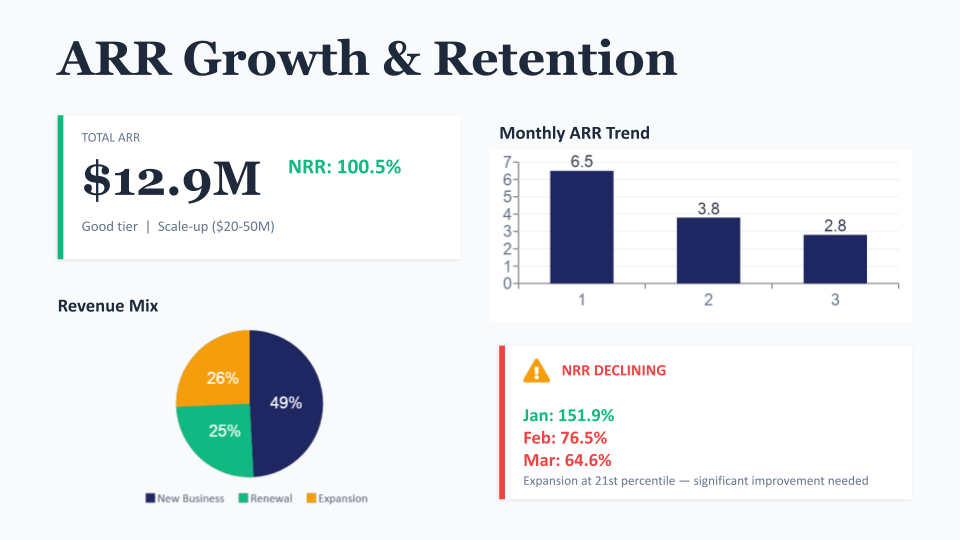
An ARR Growth & Retention slide from the investor revenue report skill. The same CRM data, reframed for a board audience with growth trends, revenue mix, and retention benchmarks.
Why it matters: The slide above shows $12.9M total ARR with NRR at 100.5%, but it also flags that NRR is declining (151.9% in January to 64.6% in March) and that expansion is at the 21st percentile. This is the kind of nuanced, benchmark-aware analysis that would take hours to assemble manually — pulling ARR figures, calculating retention cohorts, sourcing industry benchmarks, and formatting it into a presentation that a board member can consume in two minutes. The skill does it from live data in a single prompt.
Pipeline Surveillance — The Revenue Monitor
The problem: Dashboards show you what your pipeline looks like right now. They do not tell you what changed. A deal that dropped from 70% to 45% health score over three weeks is invisible on a dashboard unless you happen to remember what it was last time you looked. Pipeline drift — the slow, silent erosion of deal health — is one of the biggest sources of forecast surprise, and it happens between the moments when you are paying attention.
What the skill does: The /revenue-monitor skill is fundamentally different from the other six. It is not a report generator — it is a surveillance system. Each week, it pulls a complete snapshot of your pipeline: every deal’s health score, framework completion, stage, forecast category, and activity recency. It stores this snapshot, then compares it against the snapshot from four weeks prior. When it detects meaningful changes — a health score drop beyond the threshold, a deal gone dark, a forecast category shift — it does two things: writes an alert note directly into the affected deal in the CRM, and generates a digest summarising all changes.
The write-back capability is what makes this skill different from a dashboard. The alert is not in a separate tool or email that gets buried. It appears in the deal record itself — the next time the rep or manager opens that opportunity, the context is right there. This closes the loop between intelligence and action in a way that dashboards cannot.
Why it matters: Think of it as the difference between checking the weather and having a storm warning pushed to your phone. The revenue monitor watches your pipeline so you do not have to remember which deals to worry about. And because it stores raw snapshots and runs deterministic extraction (no hallucinated baselines), every metric is traceable to an actual CRM response.
Deal Execution — The Deal Action Engine
The problem: Your weekly action plan tells you which deals need attention. But knowing a deal is at risk and actually writing the re-engagement email are two different things. Generic “just checking in” follow-ups are the default because crafting a blocker-specific email for each deal takes time that does not exist.
What the skill does: The /deal-action-engine skill reads the MEDDPIC framework gaps and notes summary on each at-risk deal, diagnoses the specific blocker, and drafts a tailored re-engagement email that addresses the actual obstacle. If Paper Process is stalled, the email is about unblocking procurement. If the Champion is weakening, it arms them with ammunition for their internal case. If Decision Criteria shifted after a competitor demo, it acknowledges the new requirements and proposes a path forward. The skill creates Gmail drafts and logs the action back to the CRM.
Why it matters: The core principle is that a re-engagement email should address the thing that is actually stuck, not just remind the contact you exist. This requires reading framework scores, interpreting notes, and understanding deal context — exactly the kind of synthesis that AI excels at when it has access to the underlying data. The skill bridges the gap between CRM intelligence and outreach execution.
Win/Loss Pattern Analysis
The problem: Every sales leader asks the same strategic question at some point: what separates our wins from our losses? The answer usually lives scattered across closed deal records, but systematically analysing framework scores, deal characteristics, activity patterns, and notes across dozens of closed opportunities is a project, not a quick check.
What the skill does: The /win-loss-analysis skill generates an 11-slide comparative analysis of closed-won vs. closed-lost deals. It examines framework scores (which MEDDPIC components predict wins?), deal characteristics (size, cycle time, discount patterns), activity patterns (engagement cadence, multi-threading), and qualitative themes extracted from deal notes. The output surfaces the specific patterns that correlate with wins and the gaps that predict losses.
Why it matters: This is the skill that changes process, not just individual deals. If the analysis shows that deals with strong Paper Process scores close at 2x the rate of those without, that shapes how you coach discovery. If deals above a certain size consistently stall at Negotiation stage, that points to a pricing or packaging problem. Win/loss analysis turns your historical pipeline into a playbook.
How the Architecture Works
Understanding the architecture helps explain why these skills produce reliable, data-grounded outputs rather than hallucinated summaries. The flow is straightforward:
- Claude Code is the execution environment — it runs skills, manages the workflow, and produces the final output (PPTX, email draft, CRM note).
- The Summit53 MCP server is the secure bridge between Claude and your CRM data. It exposes specific tools (get_opportunity, risk_heatmap, opportunity_framework_summary, weekly_action_plan, and others) that Claude can call with parameters and receive structured data back.
- Each skill orchestrates a sequence of MCP tool calls tailored to its purpose. The deal review prep skill calls 8–10 tools in parallel (deal record, framework scores, risk heatmap, deal drag, notes summary, activities, account health). The revenue monitor calls pipeline-wide tools and compares against stored snapshots. The deal action engine chains reads (framework gaps, notes) into writes (Gmail draft, CRM note).
Every data point in the output traces back to an actual MCP tool response. The skills do not guess at deal amounts or fabricate framework scores. If a tool returns that MEDDPIC completion is 48% with Decision Process stalled, that is exactly what appears in the deck. This traceability is what makes the outputs trustworthy enough to present to a board or use as the basis for a coaching conversation.
For a deeper look at the MCP tools available, see the MCP tool reference.
Skills Meet You Where You Already Think
There is a broader shift happening here that is worth naming. The traditional model for CRM intelligence has been: log into the tool, navigate to the right view, interpret the dashboard, export the data, build the deliverable. Each step adds friction between seeing the data and doing something with it.
Claude Code skills invert that model. Instead of going to your data, your data comes to the environment where you are already working. If you already use Claude to think through deal strategy, draft executive communications, or structure your pipeline reviews, these skills simply give Claude access to the actual numbers. The conversation shifts from “hypothetically, if a deal had these characteristics...” to “pull the data on Sprout Retail and tell me what is actually happening.”
This is what the 2026 skill economy looks like in practice. The MCP ecosystem has grown from 1,000 servers in early 2025 to over 10,000 active servers today. Skills are not one-off prompts — they are persistent, reusable expertise embedded directly into Claude’s capabilities. And because they accept natural language triggers (not just exact slash commands), using them feels like asking a colleague for help rather than navigating a software interface.
For sales leaders, this means the strategic work — deal reviews, coaching, QBRs, pipeline surveillance, board reporting — gets done in the same place where you do your strategic thinking. The assembly disappears. The insight stays.
Getting Started
The seven skills are open-source on GitHub. Here is what you need to use them:
- Claude Code (desktop or CLI), version 1.0 or later. Skills work in both environments.
- The Summit53 MCP server, configured with your CRM authentication. The setup guide walks through the connection process.
- Gmail MCP for the deal action engine (email drafting). Optional if you only want the reporting and analysis skills.
- Node.js 18+ for PPTX generation. The presentation skills use PptxGenJS to produce fully editable PowerPoint files.
Installation is straightforward: copy the .skill files to your ~/.claude/skills/ directory (macOS) or the equivalent Windows user profile location. Once installed, the skills respond to natural language triggers — you can say “prep a deal review for opportunity 174” or “generate a QBR for this quarter” and the skill handles the rest.
A few things worth noting:
- PPTX outputs are fully editable after generation. Add your own commentary, adjust the narrative, or re-order slides before presenting.
- The revenue monitor pairs well with scheduling tools for automated weekly runs. Set it up once and it watches your pipeline continuously.
- Every skill produces outputs grounded in live CRM data. If the data in your CRM is incomplete, the skill will reflect that honestly rather than filling in gaps. Garbage in, garbage out still applies — but now the gap is visible.
If you are already operationalising sales frameworks with Summit53, these skills are the natural next step: they take the intelligence your CRM surfaces and turn it into the artefacts your leadership rhythm depends on. If you would like to see how this works for your pipeline, get in touch.