Introduction
Welcome to the Summit53 Opportunity Management system! This guide will walk you through the Opportunity Detail page, which is your command center for managing and tracking sales opportunities.
As an Account Executive, this page is where you'll spend much of your time managing pipeline, qualifying opportunities, and executing your sales methodology. This document will help you understand the features and capabilities available to you.
Accessing the Opportunity Detail Page
The Opportunity Detail page can be accessed by:
- Clicking on any opportunity from the Opportunities list page
- Clicking on an opportunity associated with an account from the Account Detail page
- Following a direct link to an opportunity
Page Overview
The Opportunity Detail page is structured to give you both a high-level view of your deal and easy access to detailed information organized by tabs. Here's what you'll find:
Header Section
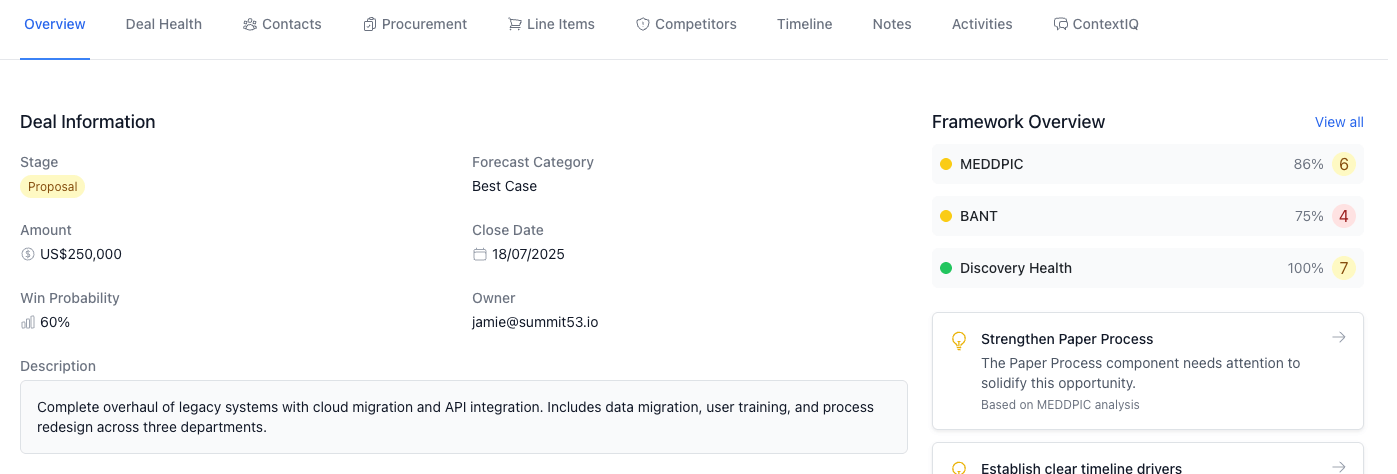
Header Section: Contains key opportunity information and actions
The header section contains:
- Opportunity Name: The name of the opportunity
- Stage Badge: Visual indicator of the current stage (color-coded)
- Account Name: Linked to the account detail page
- Deal Amount: Total opportunity value with currency
- Edit Button: Allows you to edit the opportunity details
Opportunity Waste Score
For open opportunities (not Closed Won/Lost), you'll see a waste score indicator that helps identify at-risk opportunities. This uses AI to analyze opportunity health and suggest actions to prevent wasted effort on deals unlikely to close.
Tabs Navigation
The tabs allow you to organize and access specific information about your opportunity:
- Overview: Summary of key deal information and health
- MEDDPIC: Qualification framework for complex sales
- BANT: Basic qualification framework
- Discovery Health: Deep discovery process tracking
- Three Why's: Understands root cause motivation for purchase
- Contacts: Key contacts and roles in the deal
- Procurement: Procurement process tracking
- Line Items: Products and services included in the deal
- Competitors: Competitor tracking and comparison
- Timeline: Complete history of the deal
- Notes: Deal notes and documentation
- Activities: Activities related to the opportunity
Key Features in Detail
Overview Tab
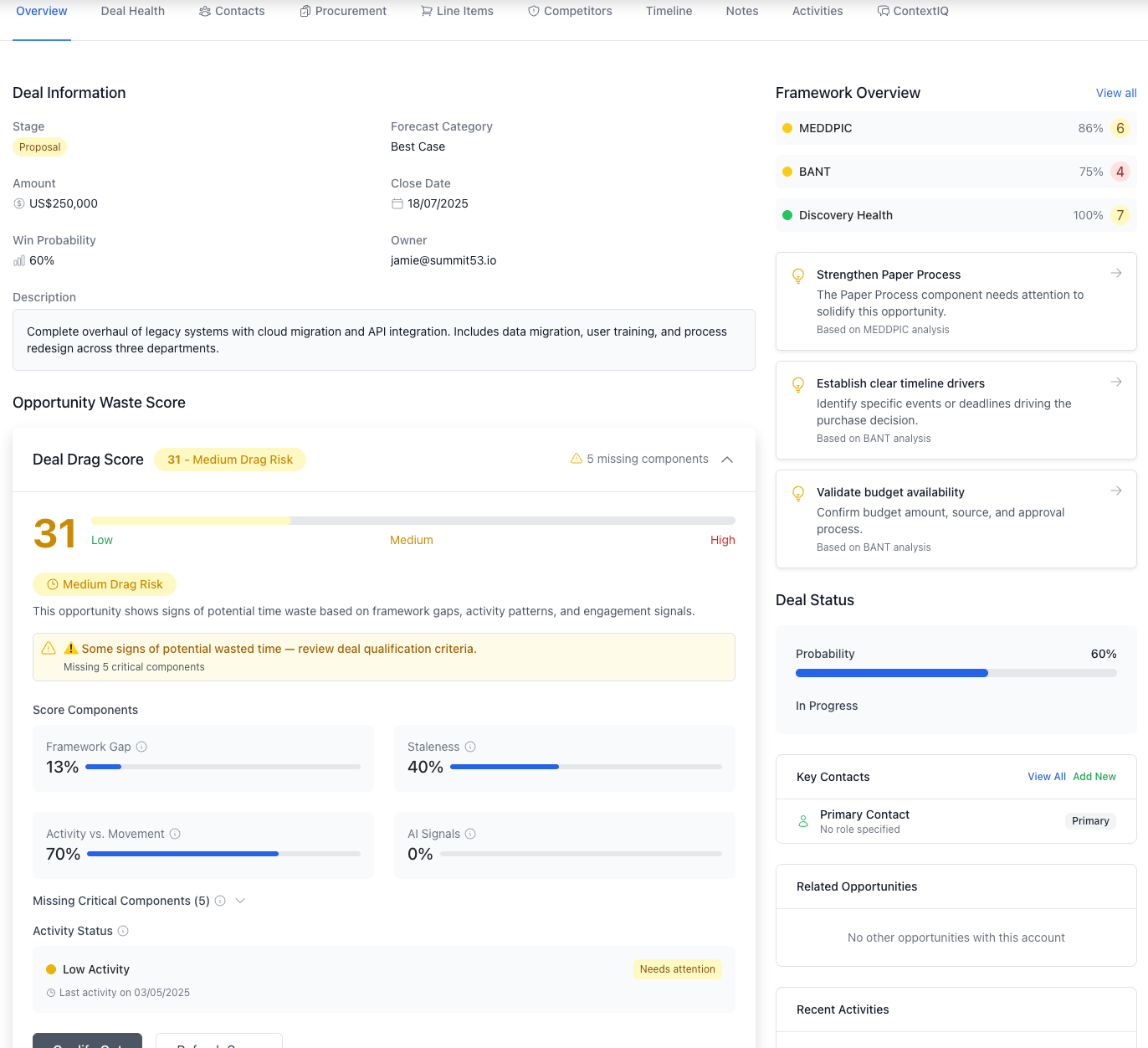
Overview Tab: Comprehensive snapshot of opportunity health and key metrics
The Overview tab provides a comprehensive snapshot of your opportunity, including:
Framework Summary Banner
Shows the health of your qualification frameworks (MEDDPIC, BANT, Discovery) with:
- Completion percentage
- Overall health score
- Key insights
- Status (Complete, In Progress, Incomplete)
This allows you to quickly assess the overall health of your qualification efforts.
Deal Information Section
Contains essential deal details:
- Stage
- Forecast Category
- Amount
- Close Date
- Win Probability
- Owner
- Lost Reason (for Closed Lost deals)
Opportunity Waste Score
For open opportunities, this shows an AI-powered score that helps identify potentially wasted sales effort. High scores indicate deals that may need to be qualified out.
Next Best Actions
AI-generated suggestions based on your qualification framework data, helping you focus on the most impactful next steps. For each action, you can:
- Add to your meeting agenda
- Create a task
- Add to coaching sessions
Deal Status
Visual indicator of deal health and progress.
Key Contacts
Quick access to view account contacts.
Sales Methodology Tabs
The Opportunity Detail page supports multiple sales methodologies:
MEDDPIC Tab
For complex enterprise sales, tracking:
- Metrics: Business value and ROI
- Economic Buyer: Ultimate decision maker
- Decision Criteria: Formal evaluation criteria
- Decision Process: How decisions get made
- Pain: Business pain points
- Identify Pain: Who feels the pain
- Champion: Internal advocate
BANT Tab
For basic qualification:
- Budget: Available funds
- Authority: Decision makers
- Need: Business requirements
- Timeline: Purchase timeframe
Discovery Health Tab
For tracking detailed discovery progress:
- Situation: Current state
- Pain: Issues and challenges
- Impact: Business impact of problems
- Critical Event: Timing drivers
- End Vision: Desired future state
- Decision Process: How decisions are made
Three Why's Tab
Deeper understanding of customer motivation through three levels of "why" questions.
Contact Management and Deal Components
Contacts Tab
Manage stakeholders and their roles in the opportunity:
- View all contacts from the account
- Assign specific roles (Decision Maker, Influencer, etc.)
- Track engagement level
Procurement Tab
Track the formal procurement process:
- RFI/RFP status
- Required approvals
- Legal review
- Contracting steps
Line Items Tab
Manage products and services included in the deal:
- Add/remove items
- Set quantities and pricing
- Apply discounts
- Calculate totals
Competitors Tab
Track and strategize against competitors:
- Log competing vendors
- Compare strengths/weaknesses
- Document displacement strategies
Deal Tracking and Documentation
Timeline Tab
Chronological view of all deal activities and milestone events.
Notes Tab
Document important discussions, decisions, and action items.
Activities Tab
Log and track all interactions with the customer.
Key Actions
Editing an Opportunity
- Click the Edit button in the top-right of the header
- Make your changes in the form
- Click Update Opportunity to save changes
- Click Cancel to discard changes
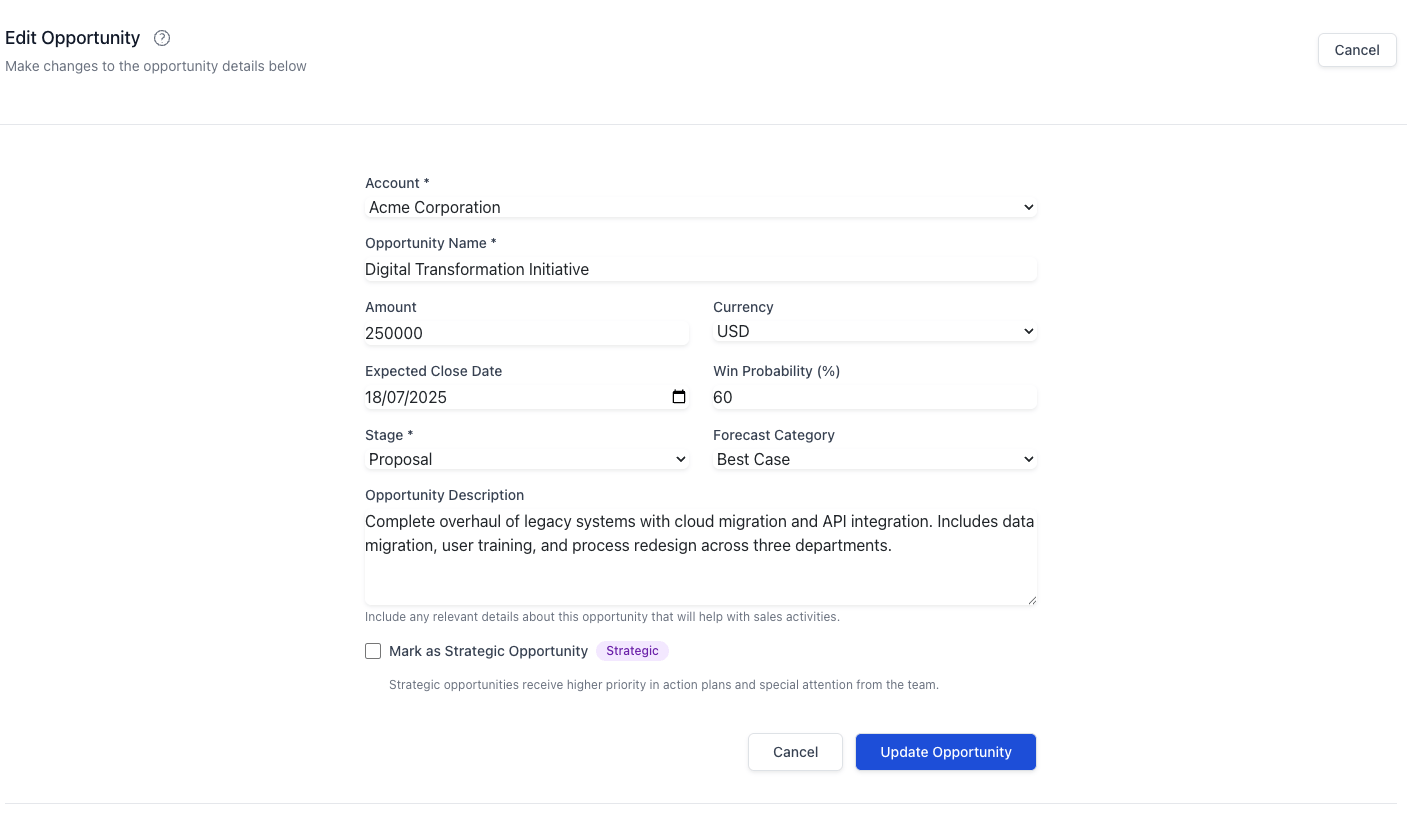
Edit Form: Form for updating opportunity details
Qualifying Out an Opportunity
If an opportunity is identified as high risk or not a good fit:
- Use the WasteSidebar indicator to assess risk
- Click "Qualify Out" to open the qualification form
- Document reasons for qualifying out
- Select the appropriate lost reason
- Submit the form to move the opportunity to Closed Lost status
Using Sales Frameworks
- Select the appropriate framework tab (MEDDPIC, BANT, or Discovery)
- Fill in the components of the framework
- Score each component based on your confidence
- Add notes and action items for each component
- Use the framework summary on the Overview tab to identify gaps
Managing Next Steps
The Next Best Actions feature provides AI-driven recommendations:
- Review the suggested actions on the Overview tab
- Use the provided question prompts in your customer conversations
- Click "Add to Agenda" to include in your next meeting
- Click "Add to Tasks" to create a follow-up task
Best Practices
Opportunity Management
- Update Regularly: Keep opportunity information current, especially after customer meetings
- Use Frameworks Consistently: Complete the qualification frameworks appropriate for your deal size and complexity
- Document Everything: Use notes to record important discussions and decisions
- Track Competitors: Document competitive information as it emerges
- Mind the Waste Score: Pay attention to the opportunity waste score to avoid pursuing poor-fit deals
Sales Process Execution
- Follow the Stage Progression: Move opportunities through stages as qualification criteria are met
- Use Next Best Actions: Let the AI-driven recommendations guide your next steps
- Update Close Dates: Keep forecasted close dates realistic
- Validate Probability: Ensure win probability reflects true confidence level
- Assign Contact Roles: Properly identify and document stakeholder roles
Getting Help
If you need assistance with the Opportunity Detail page:
- Contact your Sales Operations team
- Check the Summit53 knowledge base
- Reach out to your sales manager for guidance on qualification frameworks
This guide is designed to help you maximize your effectiveness using the Summit53 CRM. By mastering the Opportunity Detail page, you'll be able to manage your pipeline more efficiently and close more deals.
Appendix: Glossary of Terms
- Stage: Current phase in the sales process
- Forecast Category: Confidence level grouping for revenue forecasting
- Waste Score: AI-generated risk assessment for potential qualified-out opportunities
- Framework: Structured approach to qualification (MEDDPIC, BANT, etc.)
- Qualification: Process of determining if an opportunity is worth pursuing
- Champion: Internal contact who advocates for your solution
- Economic Buyer: Person with budget authority
- Line Item: Individual product or service in the opportunity